Showing posts with label keyboard Tools. Show all posts

Thursday, June 11, 2009

Portable Comfort Typing Pro 3.1.2.0


Image

Comfort Typing makes your typing faster and more pleasant.

Comfort Typing constantly monitors your keyboard and when it detects a keyword, it replaces the keyword with a predefined text.
There are two types of text templates: plain text and RTF (Rich Text Format - as in MS Word, OpenOffice, MS WordPad, etc).

Built-in multilingual word autocomplete function completes words you are typing.

Comfort Typing will help you to quickly complete the following tasks:

* Paste frequently used phrases, signatures, dates, addresses, greetings, passwords, etc.
* Create all kinds of messages and documents using templates.
* Switch the language or layout for the recently typed text.
* Change the language or layout for the selected text.
* Change the case of the selected text: lower case, UPPER CASE, Sentence case., iNVERT cASE , Capitalize Each Word.

Comfort Typing can show the input language flag next to the caret or in the system tray (next to the clock).

You can add various macros to the text templates: keystrokes, date, time, tags for inserting random text from a predefined list, etc.

You can protect your text templates with a strong 448-bit Blowfish encryption.

It is easy to use Comfort Paste in workgroups. To do it, just save the template file to a network resource and configure it to be used on every workstation.

Comfort Typing has powerful features that will help to forget about the routine of your work and speed it up.

! Comfort Typing is also available as part of Comfort Keys which also includes Comfort On-Screen Keyboard and Comfort Clipboard.

It is completely compatible with Microsoft® Windows Vista, XP and 2000.


http://rapidshare.com/files/186889881/Comfort_Typing_Pro_3.1.2.0.rar

Portable Typing Master Pro v7.0.1.763


Image

Meet TypingMaster Pro, the personal typing trainer that adapts to your unique needs. The program provides customized exercises and helpful feedback to guide you step by step to professional keyboarding. As a result your typing speed will increase significantly saving you a lot of valuable work time.


Adjusts to Your Progress
At every stage training is adjusted to your personal progress. Weak spots are pinpointed and rapidly eliminated with additional exercises. Thanks to this personal approach you can put your new skills into action after only 3 to 5 hours of training.

Optimized Duration
TypingMaster Pro lets you complete exercises quicker when you are making rapid progress and provides extra practice when needed.

TypingMaster Satellite
TypingMaster Satellite analyzes your typing in other programs and then provides training for those keys and words that are identified as difficult.

Smart Review
The program tracks your mistakes and creates tailored review exercises to work on these weak spots.

Bite Size Exercises
Each exercise takes only a couple of minutes making it easy to fit training even into the tightest schedule.


http://rapidshare.com/files/179879486/backup744_filecatchers.rar

Portable Ten Thumbs Typing Tutor 4.2.2


Image

"The easy and fun way to learn to type. Ideal for adults and kids. "

Typing is an essential skill. For the price of one takeout pizza you could:

Double your productivity at work or school
Increase your employment opportunities
Reduce the strain of using your computer
Ten Thumbs is the award winning, easy and fun way to get typing. Learn the proper way to type without looking at the keys. Our unique personal trainer approach adapts to you, teaching the best habits from day one. Ten Thumbs is engaging for children and yet simple enough for adults! Plus, its the only program that lets you learn by typing the lyrics to your favorite iTunes.

Features:

Mac Leopard and Windows Vista support
The only program that shows you the 5 Habits of Highly Effective Touch Typing
Two fun addictive games
The only program to feature a
friendly Typing Viking
Multiple languages and keyboards
The only program that lets you
type your favorite lyrics with iTunes
Dozens of other features
Get your free trial and let our friendly
Typing Viking guide you to success.


http://rapidshare.com/files/219654225/Ten.Thumbs.v4.2.2.rar

Or

http://www.easy-share.com/1904459216/Ten.Thumbs.v4.2.2.rar

Monday, May 11, 2009

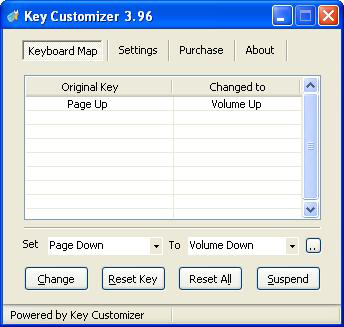
Key Customizer v3.96 [Customize your Keyboard]


Image


Key Customizer is a software which can change any key on the keyboard into other keys or disable your keys you dislike. But Key Customizer is not just a tool that allow you to customize your keyboard layout. With it, you can change your common 102 keyboard into a multifunctional one without costing much money.

Want the N key to press Ctrl+V? Want the pause key to type frequently used text such as email address? Want F9 key to turned up the volume? Want F12 to close the DVD driver? Want to lock the keyboard? Key Customizer can do these easily, it could help you make good use of each key on the keyboard.


http://rapidshare.com/files/116788724/Key.Customizer.v3.96.RES_zyberakuma.rar